Windows NT/95
The computer program responsible for managing the resources (disk drives, memory, mouse, printer,…) of a computer system is called the operating system. Windows 95 and Windows NT are two examples of an operating system.
A Graphical User Interface is a special screen that allows commands to be issued by clicking or dragging the mouse on graphic symbols such as icons, menus, scroll bar and the like.
The desktop appears after Windows NT/95 has been started (this is your personal work area). Some of the objects on the desktop worth mentioning now are:
Mouse Mechanics
Storing Information
The smallest unit of information that is stored on a disk is called a file. Related files are stored together in a folder or directory on disk. A file or folder are given names that consist of up to 255 characters including spaces. File names consist of two parts a name + extension. The extension is usually 3 characters in length (it represents the type of file, for example word processing file, pascal program, text file, and so on).
Disk Drive Designators (may vary depending on computer)
Path
The path to any file on disk is represented as:
drive:\directory1\directory2\…\directoryN\filename.ext
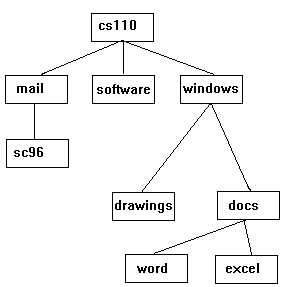
Suppose the directory structure shown in the diagram above is on the
Disk in drive A:, then
A:\cs110\windows\docs\
represents a path to any file in directory docs.
Clipboard Viewer
The clipboard is the vehicle used to transfer information (text, graphics,…) from one application to another.